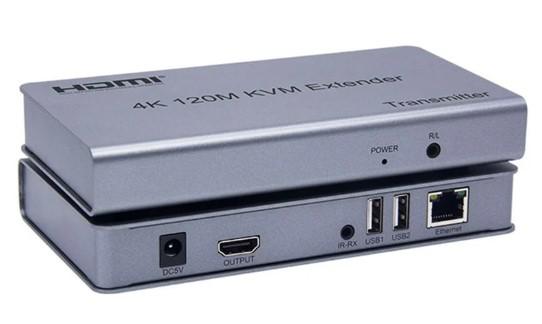
The 4K 120M HDMI and USB to Network Cable KVM Extender is a specialized device designed to extend HDMI (video), USB (keyboard, mouse), and sometimes audio signals over a single LAN network cable. The device extends HDMI signals with resolutions up to 4K@30Hz and USB 2.0 signals over Cat5e/6 network cables up to a maximum length of 120 meters.
This device set typically consists of two parts:
- Transmitter (TX): Connects to the signal source (computer, camera recorder, HD player, etc.) via HDMI and USB cables.
- Receiver (RX): Connects to the monitor, keyboard, and mouse at the user's location.
These two units are linked by a single Cat5e or Cat6 network cable, allowing transmission distances of up to 120 meters, while ensuring sharp 4K image resolution without signal degradation.
Specifications of the 4K 120m KVM Extender
- HDMI Input: Supports HDMI 1.3/1.4/2.0 with resolutions up to 1080p, 4K@30Hz.
- USB Input: Supports USB 2.0 connectivity for keyboards, mice, and other USB devices.
- Signal Transmission Distance: Up to 120 meters via CAT5e or CAT6 network cable.
- Resolution Support: 1080p Full HD, 4K@30Hz.
- Output Ports: HDMI (1 output) and USB (2 ports for keyboard and mouse).
- Power Supply: 5V DC, easy to connect to power.
- Dimensions: Compact, easy to install and move.
- Operating Environment: Temperature from 0℃ to 40℃, humidity from 10% to 85%.
Highlights
- Superior Signal Transmission Distance Extension: This is the device's strongest point, allowing high-resolution HDMI and USB signals to be transmitted over a LAN network cable up to 120 meters, breaking the distance limitations of conventional HDMI and USB cables.
- 4K Resolution Support: The device is capable of transmitting high-definition 4K (3840x2160p) video signals at 30Hz or 60Hz (depending on model), meeting the needs for high-quality movie viewing, graphic design work, or camera surveillance.
- KVM (Keyboard-Video-Mouse) Feature: Allows users to control a computer or source device remotely with just one set of keyboard, mouse, and monitor, eliminating the need to sit near the server or source device.
- Uses Common Network Cables: Utilizes Cat5e/Cat6 network cables, which are very common, easy to install, run through walls, and much more affordable than specialized long HDMI cables.
- Plug-and-Play Design: Most products feature a plug-and-play mechanism, requiring no complex software installation.
- Supports Additional Features: Some models also integrate a 3.5mm audio port, an infrared (IR) control port for remote control of devices like players, TVs, or an HDMI loop-out feature (local output) at the transmitter (TX).
Applications
This device is an ideal solution for many professional environments:
- Data Centers, Server Rooms: Helps technicians manage and maintain servers from a separate control room, away from noise and high temperatures.
- Security Surveillance Systems (cameras): Extends signals from camera recorders (NVR/DVR) to surveillance monitors in guard rooms or control rooms, making monitoring more convenient.
- Professional Presentation Systems: Used in meeting rooms, auditoriums, exhibitions, where content needs to be projected from a computer far from the display screen.
- Factories, Production Lines: Allows engineers to control production line operating computers from a safe location, avoiding dusty, vibrating, or chemical environments.
- Personal Use: For those who want to place their PC in another room to reduce noise and heat but still want to use a monitor, keyboard, and mouse in their workspace.
Notes on Usage
- Network Cable Quality: To achieve the best distance and quality, it is recommended to use pure copper core Cat6 network cables. Poor quality cables may reduce transmission distance or cause signal interference.
- Power Supply: Both the transmitter (TX) and receiver (RX) need to be powered separately by the included adapter for stable operation.
- Resolution Compatibility: Carefully check the specifications to ensure the device supports the resolution you need (e.g., 4K@30Hz or 4K@60Hz).
- Do Not Share Transmission Line: The network cable connecting the transmitter and receiver should be used exclusively and not shared with other network devices such as computers, switches, or routers to avoid signal conflicts and ensure bandwidth.
The 4K 120M HDMI and USB to Network Cable KVM Extender is an effective and cost-efficient solution for extending video signals and controlling computers remotely. With its ability to transmit 4K signals over distances up to 120m using standard network cables, this device is indispensable for professional systems such as control rooms, data centers, or surveillance systems.