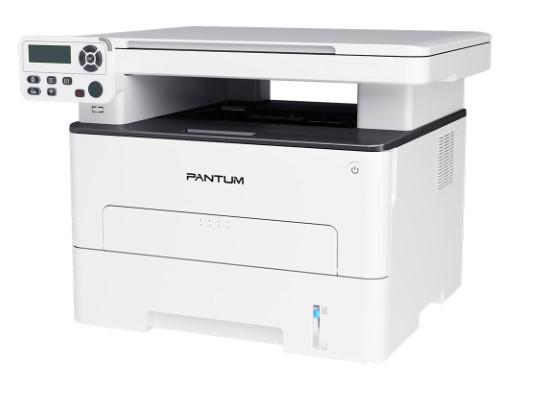
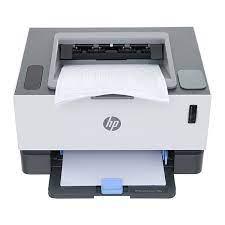
Pantum M6702DW Monochrome Multifunction Laser Printer is a multi-function monochrome laser printer (print, copy, scan) designed for small offices, home offices, or workgroups with diverse document processing needs. The printer stands out with fast print speeds, flexible wireless connectivity, and an Auto Document Feeder (ADF), delivering high work efficiency.
Specifications of Pantum M6702DW Monochrome Multifunction Laser Printer:
- Functions: Print, Copy, Scan (3-in-1 multifunction).
- Print Speed: Up to 30 ppm (A4) / 32 ppm (Letter).
- First Print Out Time: Less than 7.8 seconds.
- Automatic Duplex Printing: Yes.
- Print Resolution: Up to 1200 x 1200 dpi.
- Copy Speed: Up to 30 ppm (A4) / 32 ppm (Letter).
- Scan Speed: Up to 24 ppm (A4) / 25 ppm (Letter).
- Automatic Document Feeder (ADF): 50 sheets.
- Connectivity: High-speed USB 2.0, Ethernet (LAN), Wi-Fi (2.4G).
- Processor: 525 MHz.
- Memory: 256 MB.
- Paper Trays: 250-sheet standard tray, 1-sheet multipurpose tray.
- Control Panel: 2-line LCD.
- Mobile Printing Support: AirPrint, Mopria Print Service, Pantum App (iOS/Android).
- NFC Function: Yes (for Android).
- Max Monthly Duty Cycle: 60,000 pages.
- Recommended Monthly Volume: 750 to 3,500 pages.
Technology Highlights
PANTUM M6702DW is equipped with advanced technologies to optimize performance and convenience:
- Multifunction and High Speed: Integrates Print, Copy, and Scan functions to meet all office document needs. With 30ppm (A4) speed and fast first-page-out time, it handles work efficiently and saves time.
- Automatic Duplex Printing: Helps save paper and time by automatically printing on both sides of the paper, especially useful for long documents or reports.
- 50-Sheet Auto Document Feeder (ADF): Allows copying or scanning multi-page documents automatically without placing each page manually on the glass, significantly boosting productivity.
- Flexible Connectivity:
- Wi-Fi and Ethernet (LAN): Provides flexible network connectivity, allowing multiple users to share the printer and print from various devices on the same network.
- NFC (Near Field Communication): Allows Android users to tap their phone against the printer for instant connection and print/scan commands.
- Mobile Printing Support (AirPrint, Mopria, Pantum APP): Ensures wide compatibility with mobile devices, allowing easy printing from iPhones, iPads, smartphones, or tablets.
- Separate Toner and Drum: Uses a separate toner and drum system, meaning you only replace the depleted component rather than the whole assembly, saving long-term operational costs. High-capacity toner (up to 6,000 pages) and drum (12,000 pages) options minimize replacement frequency.
- Durable Design: Internal metal frame enhances durability and stability in demanding office environments.
Effective Usage Guide
- Initial Setup:
- Placement: Place on a flat, stable, and dry surface with adequate ventilation space.
- Power Connection: Plug the power cord into the printer and a stable outlet.
- Network Setup:
- USB: Connect via USB 2.0 cable to the computer.
- Ethernet: Connect LAN cable from the printer to the network router/switch.
- Wi-Fi: Enable Wi-Fi on the printer and follow LCD instructions to connect to your Wi-Fi network.
- Driver Installation: Download the latest driver from Pantum's official website (global.pantum.com).
- Printing Usage:
- Duplex Printing: Enable 2-sided printing for long documents to save paper.
- Print Quality: Use default resolution for normal text; use 1200x1200 dpi for high-detail documents.
- Mobile Printing: Utilize AirPrint, Mopria, or Pantum App. For Android NFC devices, tap the phone on the NFC area.
- Copy and Scan Usage:
- ADF Usage: Place documents in the ADF tray for multi-page copying/scanning.
- Scan Destinations: Supports scanning to PC, email, FTP, or USB.
- Special Copy Features: Utilize ID copy and N-up copy modes.
Important Notes
- Genuine Consumables: Always use genuine or high-quality compatible toner cartridges and drum units recommended by Pantum.
- Periodic Maintenance:
- Cleaning: Regularly clean dust on the surface and paper trays after turning off and unplugging.
- Paper Jam Handling: Turn off and unplug before gently pulling jammed paper in the flow direction.
- Fuser Unit Warning: Avoid touching the hot fuser unit inside after printing.
- Firmware Updates: Periodically check and update firmware from Pantum's website.
- Environmental Conditions: Keep in a dry, cool place away from high humidity or extreme temperature fluctuations.
PANTUM M6702DW Monochrome Multifunction Laser Printer is a comprehensive printing solution for small offices or workgroups, combining fast print speed, automatic duplex, convenient ADF, and flexible connectivity (USB, LAN, Wi-Fi, NFC) to meet all daily document needs while optimizing operating costs.