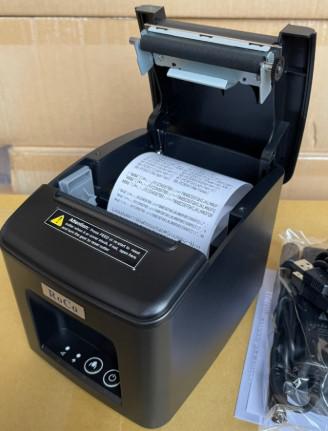
Roco Q80C Receipt Printer is a specialized thermal printer commonly used at POS (Point of Sale) counters in retail stores, supermarkets, restaurants, and coffee shops. It uses direct thermal printing technology, eliminating the need for ink and helping to save costs while increasing printing speed.
Specifications
- Printing Method: Direct Thermal
- Paper Width: 80 mm (max roll diameter 80 mm)
- Printing Speed: 230 mm/s
- Interface: USB, LAN
- Input Buffer: 64 Kbyte
- NV Flash Memory: 256 Kbyte
- Operating Voltage: DC 24V / 2.5A
- Cash Drawer Output: DC 24V / 1A
- Auto-Cutter: Yes
Key Features
- Large Paper Width (80mm): Uses standard 80mm thermal paper, displaying clearer and more complete information than 58mm.
- High Printing Speed: 230 mm/s speed reduces waiting time at checkout counters during peak hours.
- Direct Thermal Technology: No ink ribbons or cartridges needed, saving supply costs and reducing maintenance.
- High Durability & Auto-Cutter: Equipped with a durable thermal print head and built-in auto-cutter for neat and quick receipt cutting.
- Flexible Connectivity: Supports USB, LAN/Ethernet, and RJ11 cash drawer ports.
Basic Instructions
- Loading Paper: Open the printer cover, place the 80mm thermal paper roll correctly, pull a small piece out, and close the cover securely.
- Connecting: Connect the USB or LAN cable, plug in the power supply, and turn on the power switch.
- Driver Installation: Install the corresponding driver for your operating system.
- Printing: Configure the printer in your POS software and execute print jobs.
Notes
- Use high-quality 80mm thermal paper.
- Clean the print head periodically (1-2 times/month) using Isopropyl Alcohol (IPA) and a soft cotton swab. Do not use sharp objects.
- Avoid high temperatures and direct sunlight.
- Always turn off the power when replacing paper or cleaning.
- Do not pull paper backward manually.